Know your team's real capacity.
Before it becomes a problem.
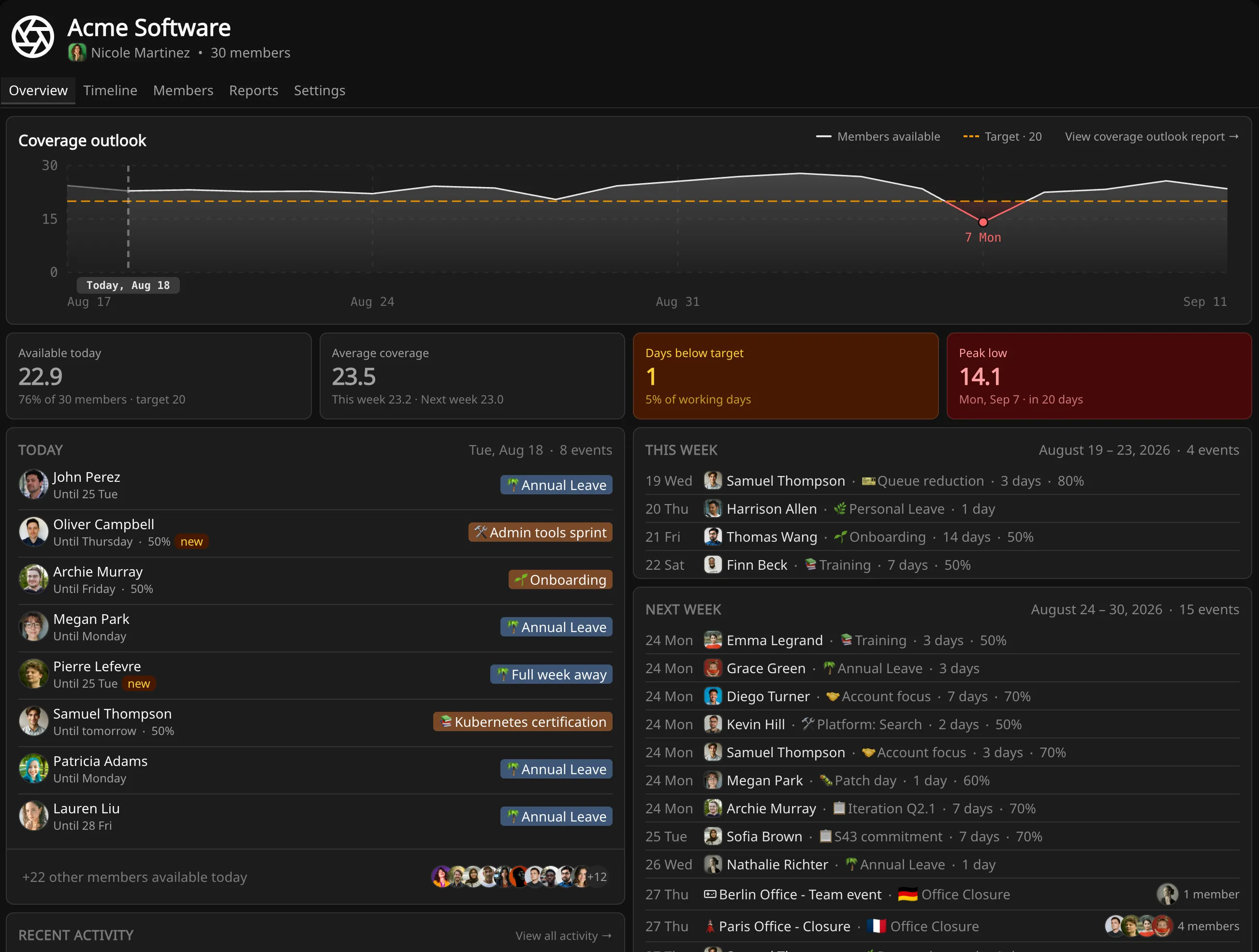
Temprix records each person's availability as a fraction rather than a yes or no, and sums it into a coverage number for every day ahead. A team of fifteen might have 8.8 people available on the 27th.
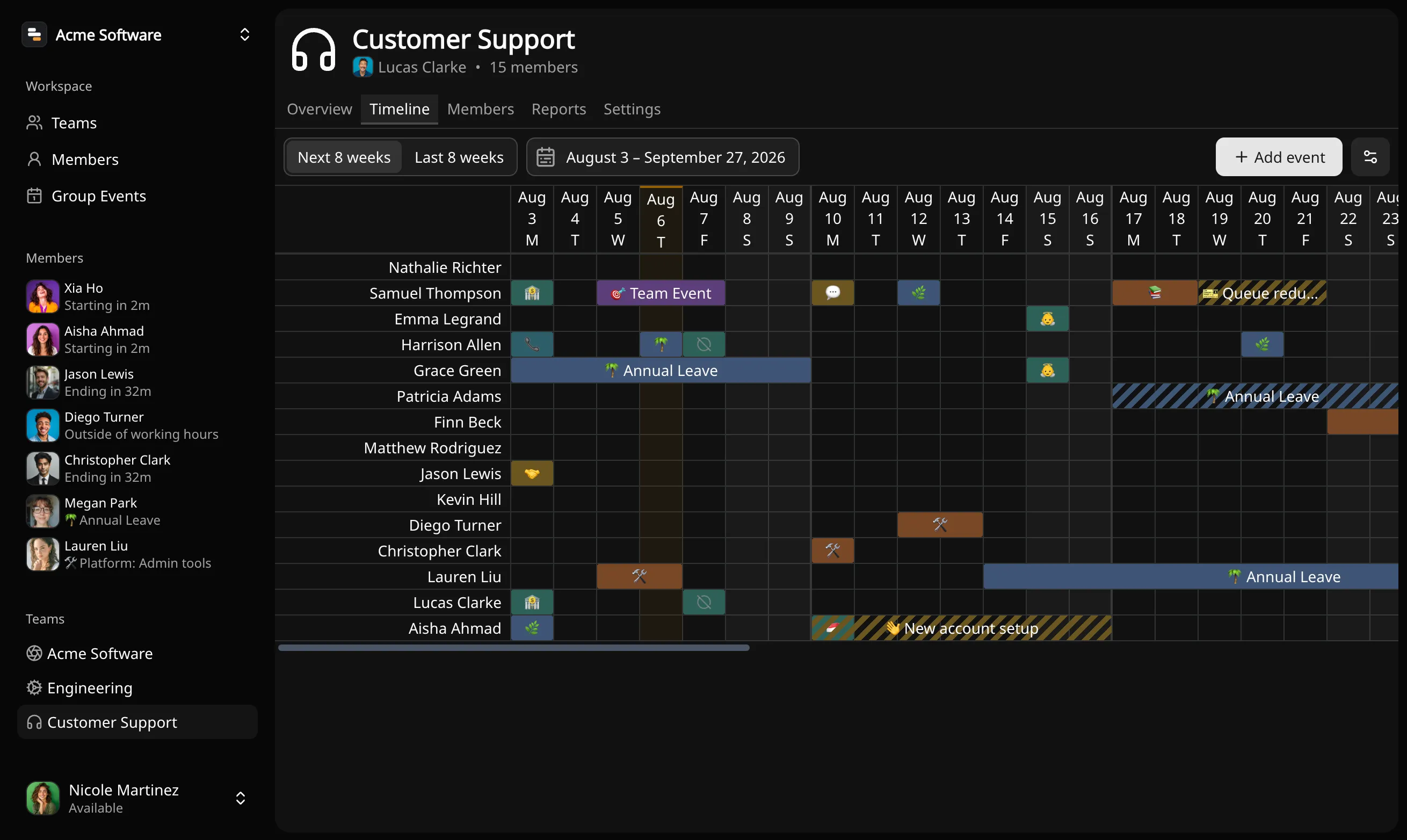
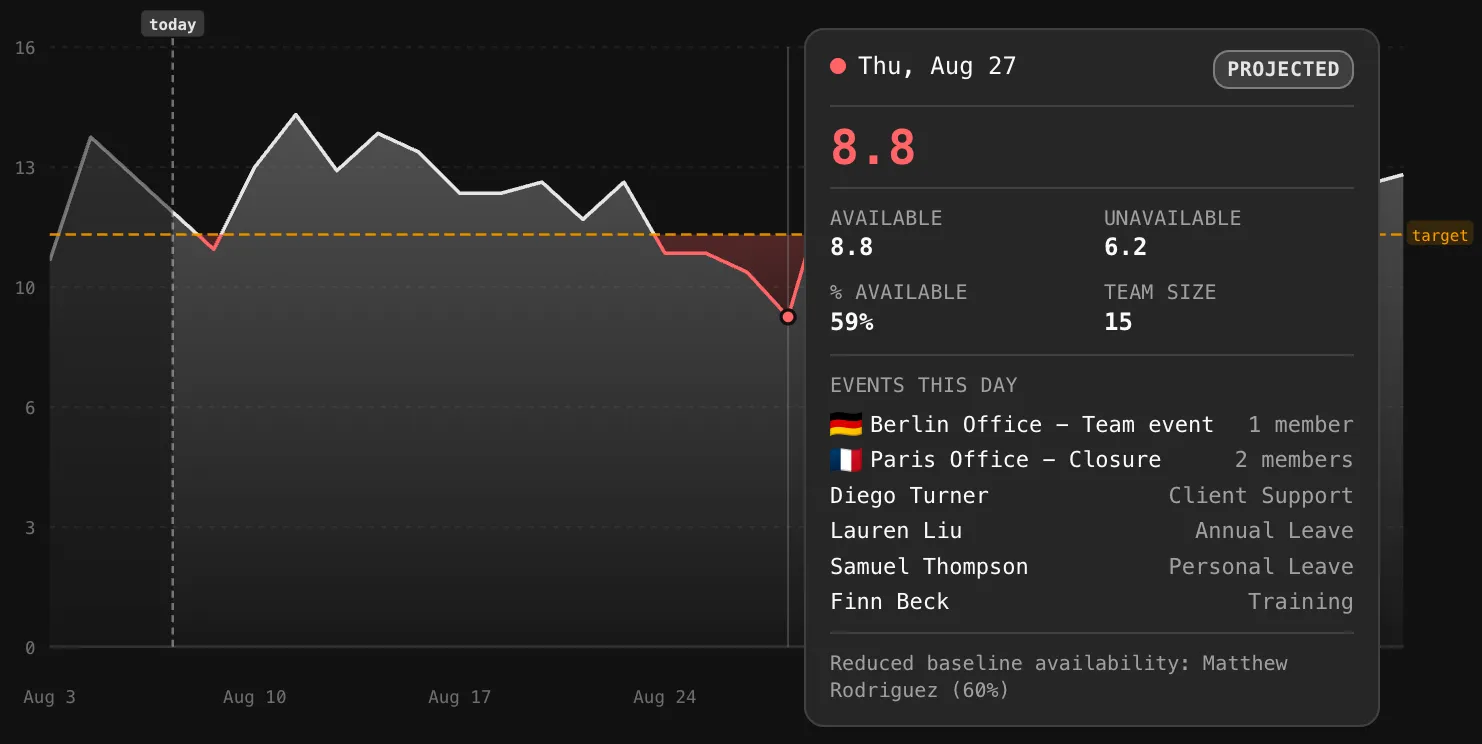
A person is not always in or out.
Your team is rarely as large as its headcount. Temprix records how much of each person is available on each day and adds it up, so you have one number for every day ahead. Switch things off below and watch the next two weeks change.
Headcount and coverage
are not the same number.
Headcount overstates what you have
Two people are in training, one is onboarding, one is half on an internal project, one is on call. The roster says twelve. The queue sees fewer.
Overlaps are hard to see coming
Approved leave, a training week and public holidays in three countries can land in the same fortnight without anyone noticing until it arrives.
Requests are answered without the numbers
Leave is usually approved before anyone can see its effect on a specific week. The consequence surfaces later, in response times and unplanned cover.
How much of each person you have, on each day.
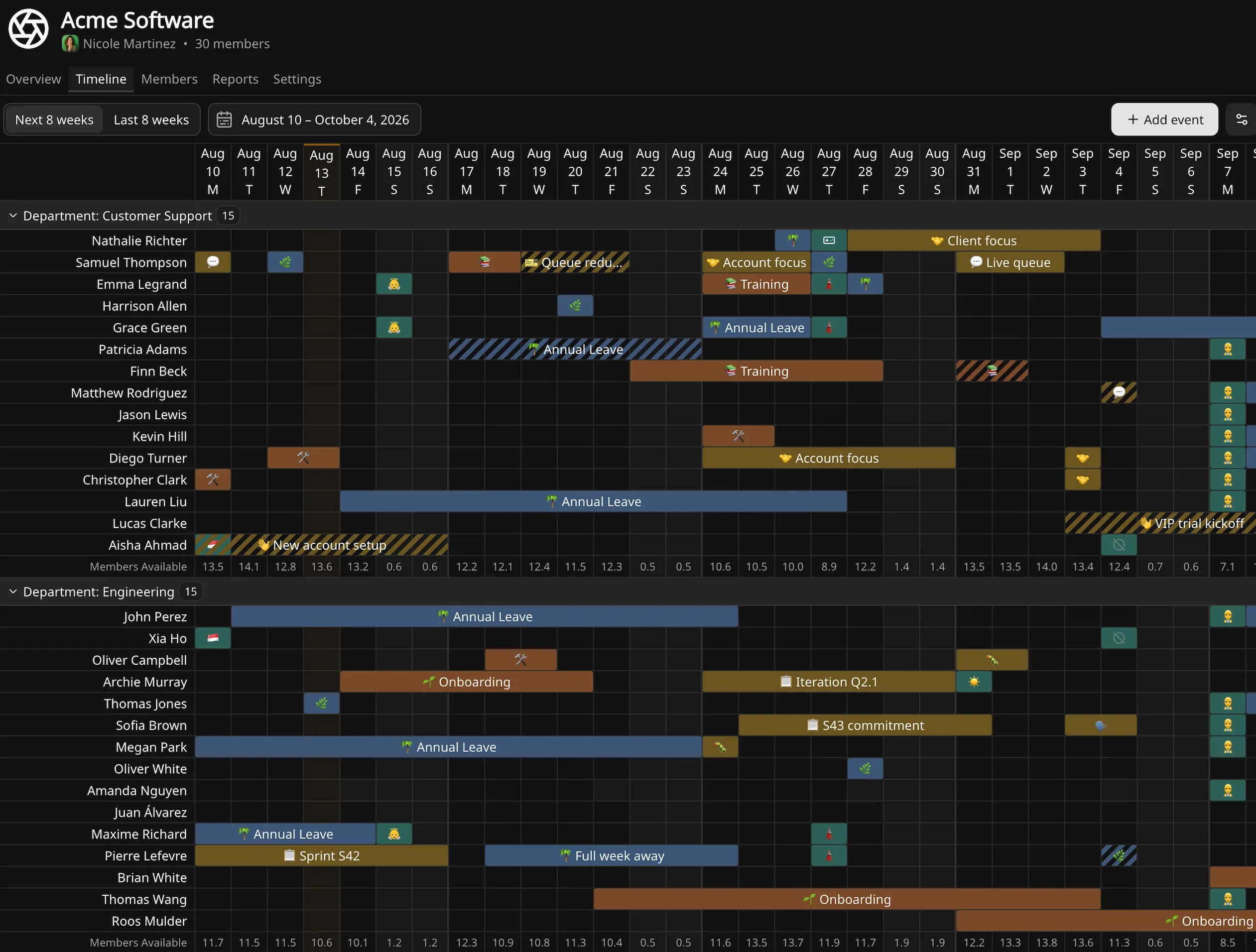
One timeline for everything that moves the number.
Leave, training, onboarding, on-call, public holidays — every event that shapes availability lives on a single shared timeline. Structured event types keep entries comparable across teams.
- Non-working days, set per workspace or per member
- Baselines for people who are always partially available
- Group events for holidays, targeted by country, region or city
- Recurring events for standing commitments
- Event types carrying a default availability, extensible per team
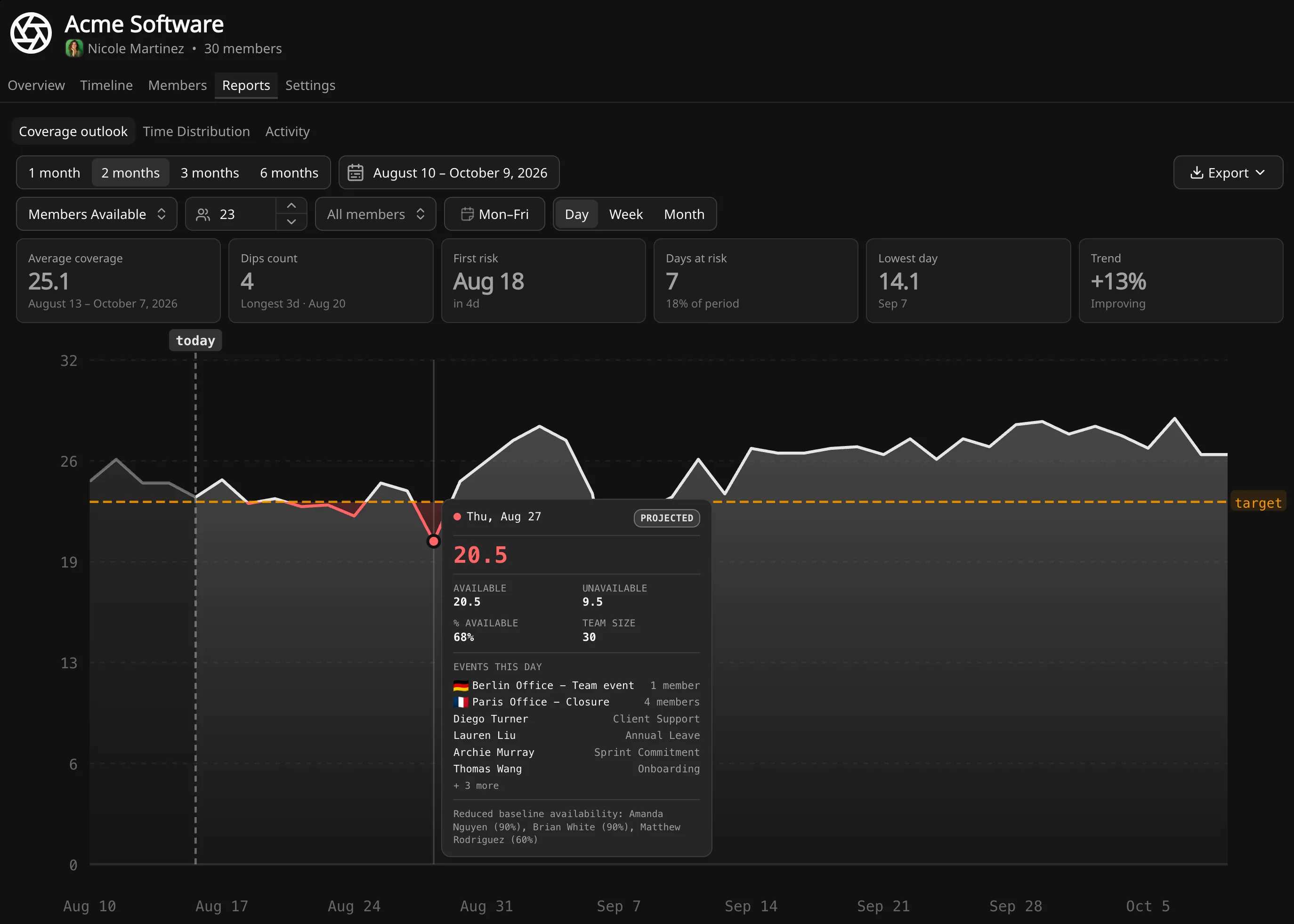
The team total, for every day ahead — and what happens when it drops.
Coverage is a number you can plan against.
The daily totals plot forward as a curve. Set a target for the team and the gap can be read directly from the chart — in people, as a percentage, or as the difference against target.
- Any window, any granularity, and you define which days count
- Set a target and read the shortfall directly
- Dips, days at risk, the lowest day and the trend, before you read the chart
- Every figure traces back to the events behind it
- Export underlying data to CSV
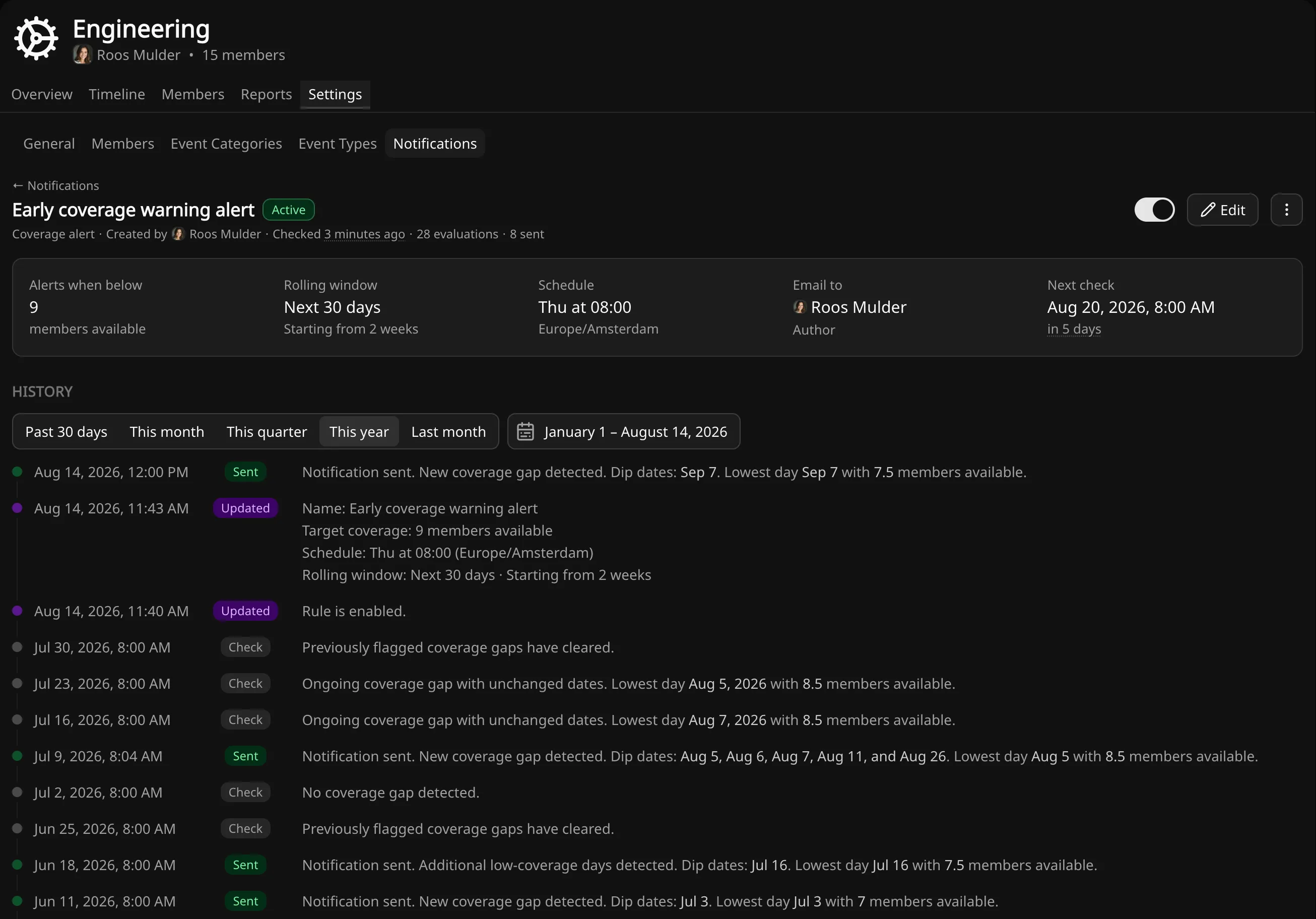
Alerts watch the number for you.
A forward view only helps on the days someone opens it. An alert rule checks the coverage figure for a team on a schedule you set, and emails you when a gap appears in the window ahead.
- Alerts on changes only: a new gap, or an existing one getting worse
- Monitors a rolling horizon, or a fixed span for a specific period
- Evaluated on a schedule you choose, in your own time zone
- Multiple rules per team, each with its own threshold — set one above your target for earlier warning.
- Every evaluation recorded, whether it sent or not
The same event data, read back across a team or a person.
The record behind the number.
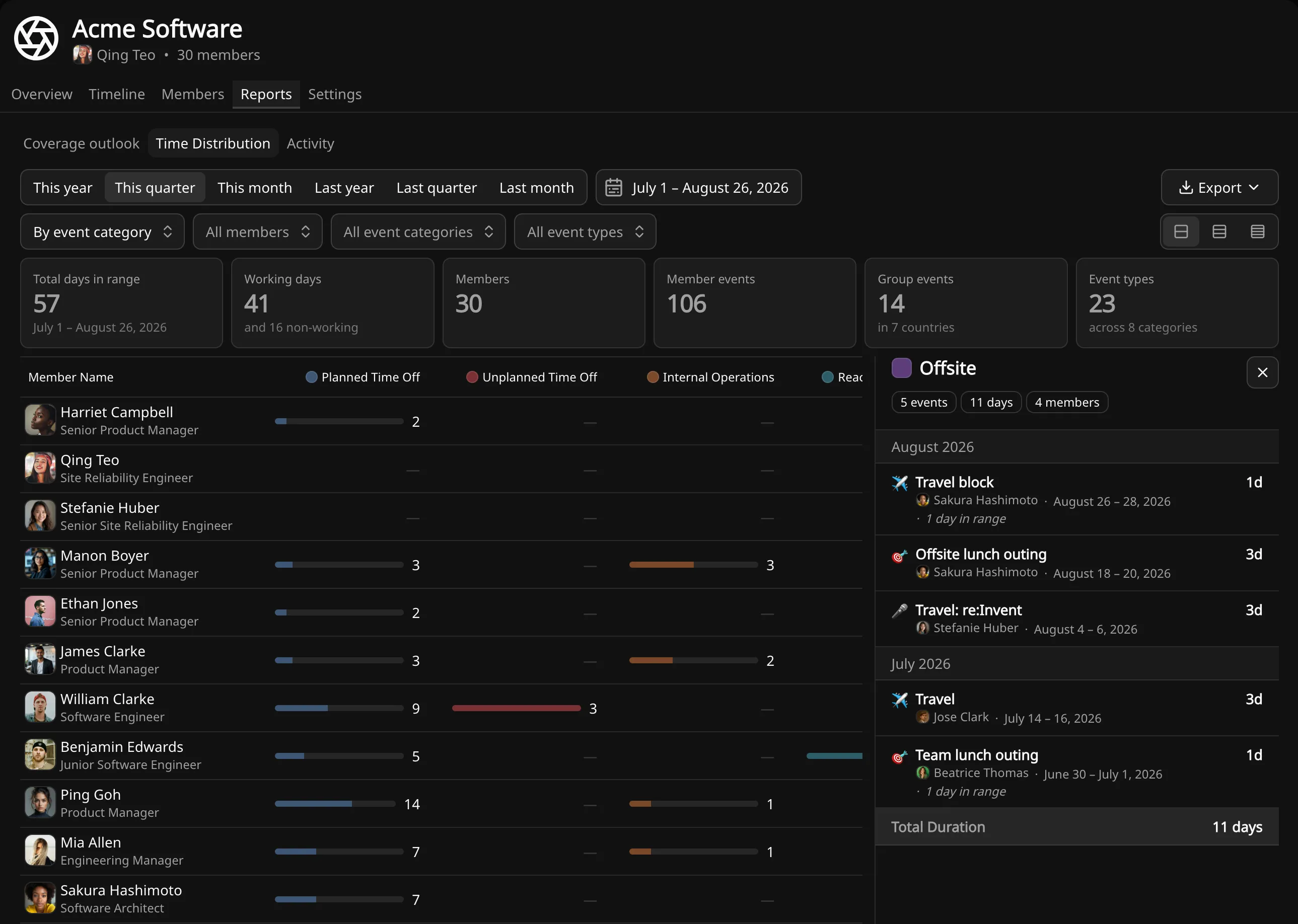
Coverage looks forward. The reports work over the same events across any period — where the time went, how it split between primary work and everything else, and who changed what.
- Time split between primary work, secondary activities and non-working days
- Distribution by category and by event type, across the team or per person
- Any figure opens into the individual events behind it
- Calendar days or working days, over any period
- A full audit trail of who changed what, and when
- CSV export from any view, with your filters applied
The same data, reachable from outside the app.
The app is just one client.
A GraphQL API over the schema the product runs on, reached with workspace-scoped keys. What the app does with your data, your own systems can do too, in both directions.
- A GraphQL API over the same schema the product runs on
- Read events, members, teams and forward coverage out, and write them back in
- Workspace-scoped keys, revoked when a member is deactivated
- Every change made over the API in the same audit trail
- Export as the report shows it, or the records behind it
Before you try it.
What you should and shouldn't expect from Temprix.
We already use a leave tracker. Why add this?
Keep it if it handles entitlements and payroll — Temprix does neither. What it adds is the arithmetic a leave tracker can't do: training at half a person's time, on-call that still counts, part-time baselines, and a coverage number for every day ahead, against a target.
We're twelve people. Isn't this overkill?
Twelve is roughly where a spreadsheet stops working, because twelve people generate enough overlapping events that nobody holds the picture. The first ten members are free, so most of the test costs nothing.
How much does it cost?
Nothing up to ten members, whole team included, no credit card. Past that it's per active member, per month — from $6, less if you pay annually. The full breakdown is on the pricing page.
Will my team keep it updated?
Everyone sees the same timeline and logs their own events, so it isn't a manager-only chore. And everyone has a reason to keep it accurate: a clear picture of teammates' availability is what lets people plan their own work around it.
We're not a support or operations team — does this still work?
If you need a certain number of people available on a given day, the model fits — whatever the team is called. It records how much of each person remains; it doesn't plan which project takes the rest.
What if we need intra-day shift scheduling?
Then you need a different tool. Temprix works in whole days at team level — how many people on the 14th, not who covers 14:00 to 18:00.
Where does our data live?
You pick your workspace's data region — US or EU — when you create it, and the choice is permanent. Availability data stays in that region. Sign-in and account data is processed in the United States. The security page has the details.
Can we take our data with us if we leave?
Yes. Every view exports to CSV with your filters applied, and the GraphQL API covers programmatic access. The events are yours; Temprix just does the arithmetic.
Does it integrate with our other tools?
Through personal API keys and CSV export from any view — that's the honest list today. Webhooks are next. No calendar sync or HR-tool import yet; if you need one, telling us is the fastest way to move it up.
You can't evaluate an empty workspace.
A new workspace starts empty, and an empty one can't show you much — coverage is flat, the reports are blank, and there's nothing for an alert to catch. So you can create a demo workspace instead: several teams, a year of events, reports and alert history already in place. Explore it at your own pace, break things, throw it away and make another. No booking, no call, nothing to import. Your real workspace sits alongside it whenever you're ready.
Built for European data rules
Availability data is personal data. Who's off sick, who's on parental leave, who's working reduced hours - it all falls under GDPR, and a tool that records it has to be built accordingly.
Read about security →Data residency
Pick the region when you create the workspace. Workspace data stays there.
Audit log
Every change recorded - who, what, when - surfaced in reports.
Admin Roles
Workspace admins and members in Standard; team admins on Business.
Find out how many people you'll really have on the 14th.
Free for up to 10 people. No credit card.