Availability is a value, not a flag.
Temprix records how much of each person is available on each day, as a percentage of their working day. Coverage and reports are arithmetic on that value.
Two states are not enough to plan with.
Most people, most days, are simply present or away. The exceptions are the few that a binary flag gets wrong. Someone in training is reachable but not on the queue. Someone splitting their week between support and another department is permanently partial. Someone on call is fully counted, and "present" does not tell you it is a rotation. Each of those is a percentage of one person, and percentages of people can be added together.
Each percentage is availability remaining on that day, not time the event consumes. Project at 33% leaves a third of the person available; annual leave at 0% means fully away, not zero time off. The values below are one team's settings, not shipped defaults.
An event does not have to reduce availability at all. On-call duty sits on the same timeline at full value, so a rotation stays visible and reportable without changing the coverage number.
How the values resolve, in full →One shared surface, where availability is recorded.
Members down, days across. Everyone in the workspace can see it, and members can record their own absence. Shared visibility is what keeps the data current, and current data is the only kind worth planning against.
- Create events for yourself or for teammates
- Overlapping events stack by category
- Group and filter rows by member attributes and custom tags
- Every change written to the audit log
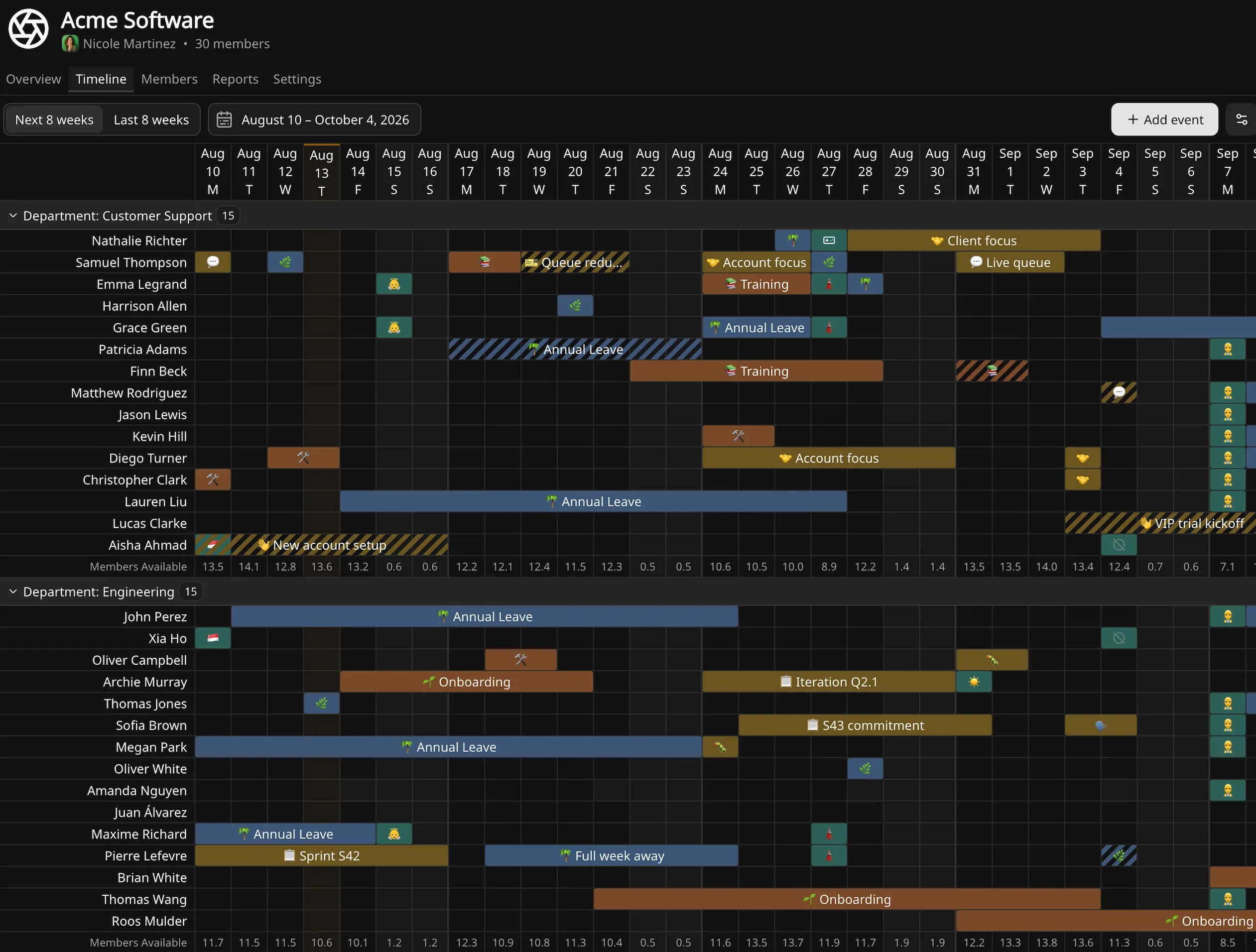
Availability before anything is scheduled.
Not everyone starts the week at full availability, and not for the same reason. A four-day contract and a half-time secondment reduce the same amount of a person over a week, but they are not the same shape, and only one of them makes Friday different from Tuesday.
Temprix keeps them apart. Both are permanent arrangements rather than absences, so neither needs a recurring event to maintain it.
- Non-working days resolve to
0%regardless of baseline - Baseline applies on any working day where no event covers the member
- Reports count working days per member, so averages stay meaningful
Fewer days: non-working days
The workspace sets a default working week, usually Monday to Friday, and any member can override it. A four-day contract is Friday off, not 80% of every day. Those two are the same total and different answers to "how many people do we have on the 14th".
Less of each day: baseline availability
A split role, a part-secondment to another department, or an engineer who owes half their week to escalations. The reduction is spread across the days they work, so every working day sits at the same value. Any value from 0% to 100%, per member.
Default availability, set by your team.
Events inherit an availability value from their type, and types inherit from their category. Either can be overridden on an individual event. Temprix ships a default set, but these are starting points: training has a different effect on a network operations team than on a claims desk.
The shared structure is what keeps records comparable. When two teams both log onboarding, they mean the same thing by it, so the numbers can be read side by side.
- Global categories with team-scoped event types
- Default availability per type, adjustable per team
- Per-event override where a particular period differs
- Colour and stacking order carried through to the timeline
Standing commitments, recorded once.
A weekly triage rotation, a monthly training block, a recurring project day. Recurrence expands into individual occurrences, so reports read the days rather than the rule, and a single occurrence can move without disturbing the series. The on-call and project rows below are the same series repeating beside one-off events on the other rows.
The holiday calendar, applied by where people actually work.
A team spread across three countries runs on three public holiday calendars. Whit Monday closes the German desk and not the British one. Mariä Himmelfahrt applies in Munich and not in Berlin. Nobody struggles to find out when those days fall; they struggle because the calendar lives in one person's spreadsheet, and the German team's availability never got blocked out.
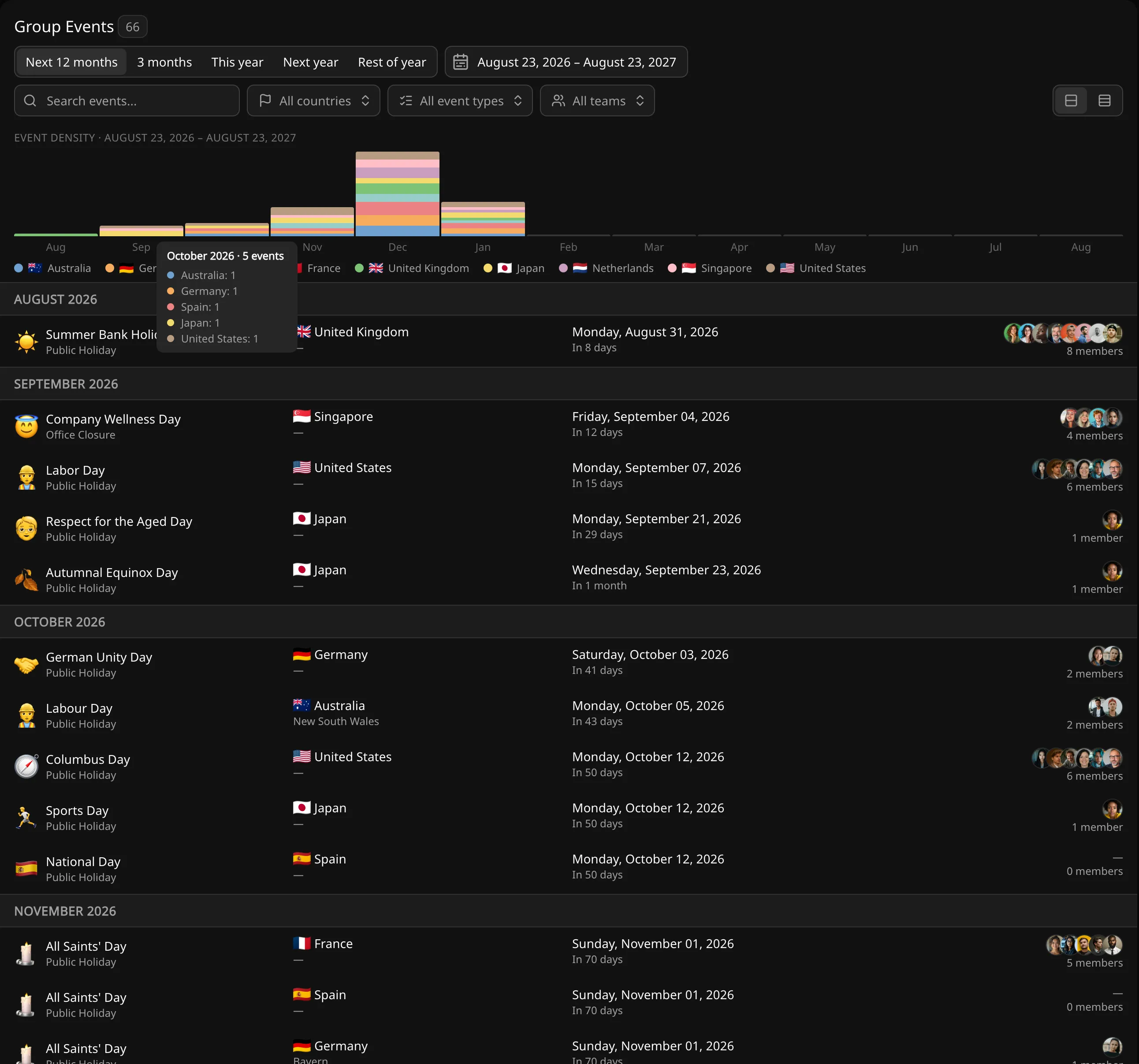
Group events are entered once and applied to everyone whose location matches, from the whole workspace down to a country, a region or a single city. No list of names to maintain, and no member quietly missed when someone joins the Munich office in March.
Holidays are the obvious case, and the same mechanism covers everything else that follows geography: office closures, shutdown weeks, summer hours, a site-wide all-hands.
- The Group Events browser shows what is coming for every location in the workspace, so the Rotterdam manager sees that Munich is out on the 15th before planning around it
- Members without a country do not match, so nothing is inferred
- A public holiday falling inside someone's annual leave counts once, not twice
Not every plan on the timeline is agreed yet.
An event can sit on the timeline unconfirmed, so the picture distinguishes what is settled from what is still being discussed: a provisional training date, or leave that is recorded but not yet confirmed. Confirming records who confirmed it and when.
Each day's percentages are added up across the team, in people. That total is the number you plan against.
Find out how many people you'll really have on the 14th.
Free for up to 10 people. No credit card.