

Audit log
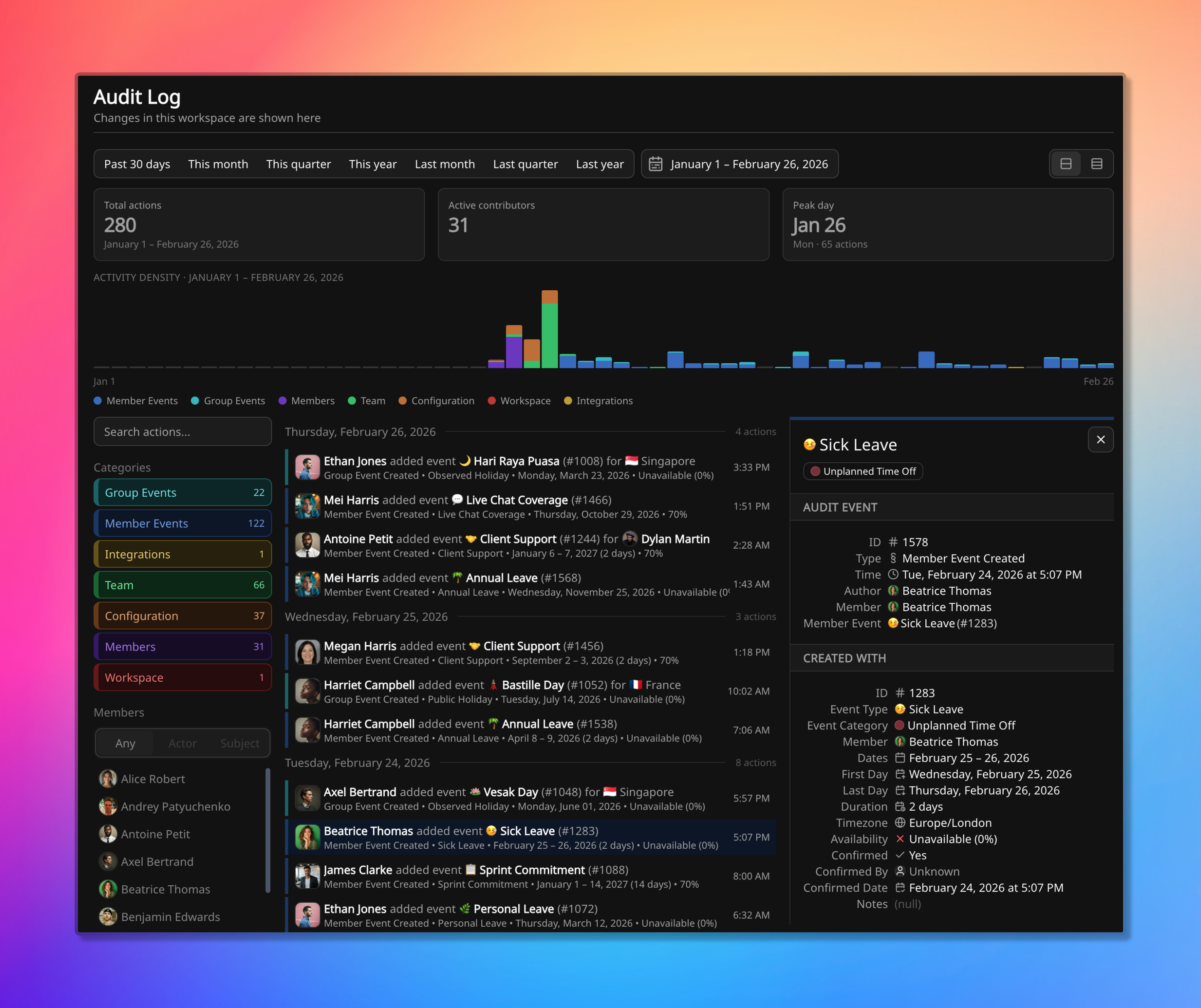
The workspace Audit Log. A create entry is open, with the snapshot of the sick leave that was written.
The Audit Log answers who changed what, and when, across the whole workspace. Typical uses include reconstructing who edited a baseline, who created an API key, what a deleted event looked like when it was removed, or who made a change over the API.
It is not a coverage view and not a time-attribution report. Those live on How coverage is calculated and Time Distribution.
The same kind of entry is also readable on a team’s Activity report, scoped to that team. This page is the workspace-wide log.
Who can read it
Section titled “Who can read it”The workspace-wide log is at Settings → Audit Log. Workspace admins can read it. On Free, every member can, because admin roles start on Standard.
Anyone’s changes are written here. Reading the workspace-wide log is the admin job.
A team’s Activity report is the same kind of entry, limited to that team. A member’s Activity tab is the same log limited to that person as the one who acted, or the one the action was about.
Reconstructing a change
Section titled “Reconstructing a change”The period is first narrowed to the change of interest, then to the kind of change or to a person:
- As actor: they performed the action (they created the leave, revoked the API key, edited the team).
- As subject: the action was about them (someone else logged their sick leave, or created a key on their behalf).
An open entry shows the action itself (who, what, when) and a snapshot of the entity at that moment. Updates show the previous value next to the new one. Deletes keep the last recorded state. Creates keep what was written.
That snapshot is a copy, not a live pointer. The audit row and the entity have separate identifiers. If the entity is later edited or deleted, this row does not change.
Worked cases:
- Who changed this baseline? Restricting to that member as the subject, then opening the member update, shows the previous baseline next to the new one.
- Who created this API key? Restricting to Integrations, or to the owner as subject, shows the row recorded against the member whose key was used, including keys created over the API. Covered on API keys.
- What did this event look like before it was deleted? The delete entry keeps the last recorded state, even though the live event is gone.
The log’s timestamp is when the action happened, not the dates on the event. An action in February can create leave dated in January of the next year.
What is recorded
Section titled “What is recorded”Creates, updates, and deletes are written as they happen. That includes:
| Kind of change | Examples |
|---|---|
| Member events | Leave, projects, on-call, confirmation and unconfirmation |
| Group events | Holidays and closures |
| Members | Roster, activation, deactivation, profile fields including baseline |
| Teams | Teams, membership, coverage-alert rules |
| Configuration | Event categories and types |
| Workspace | Workspace created or updated |
| Integrations | API keys created or revoked |
Anything that does not fall in those kinds is still written; it just is not grouped with them.
There is no export of the log, and no way to edit or delete an entry through the product, including as a workspace admin.
How long it is kept
Section titled “How long it is kept”Free workspaces keep the log for 6 months. Paid plans keep it without a fixed time limit. The current plans are on Pricing.
Where to go next
Section titled “Where to go next”- Activity report is the team-scoped read of the same kind of entry.
- Members and Workspaces are where many of these actions start.
- API keys covers creating and revoking keys, which appear as Integrations changes.