

Member Events report
The individual events behind any figure, for one member.
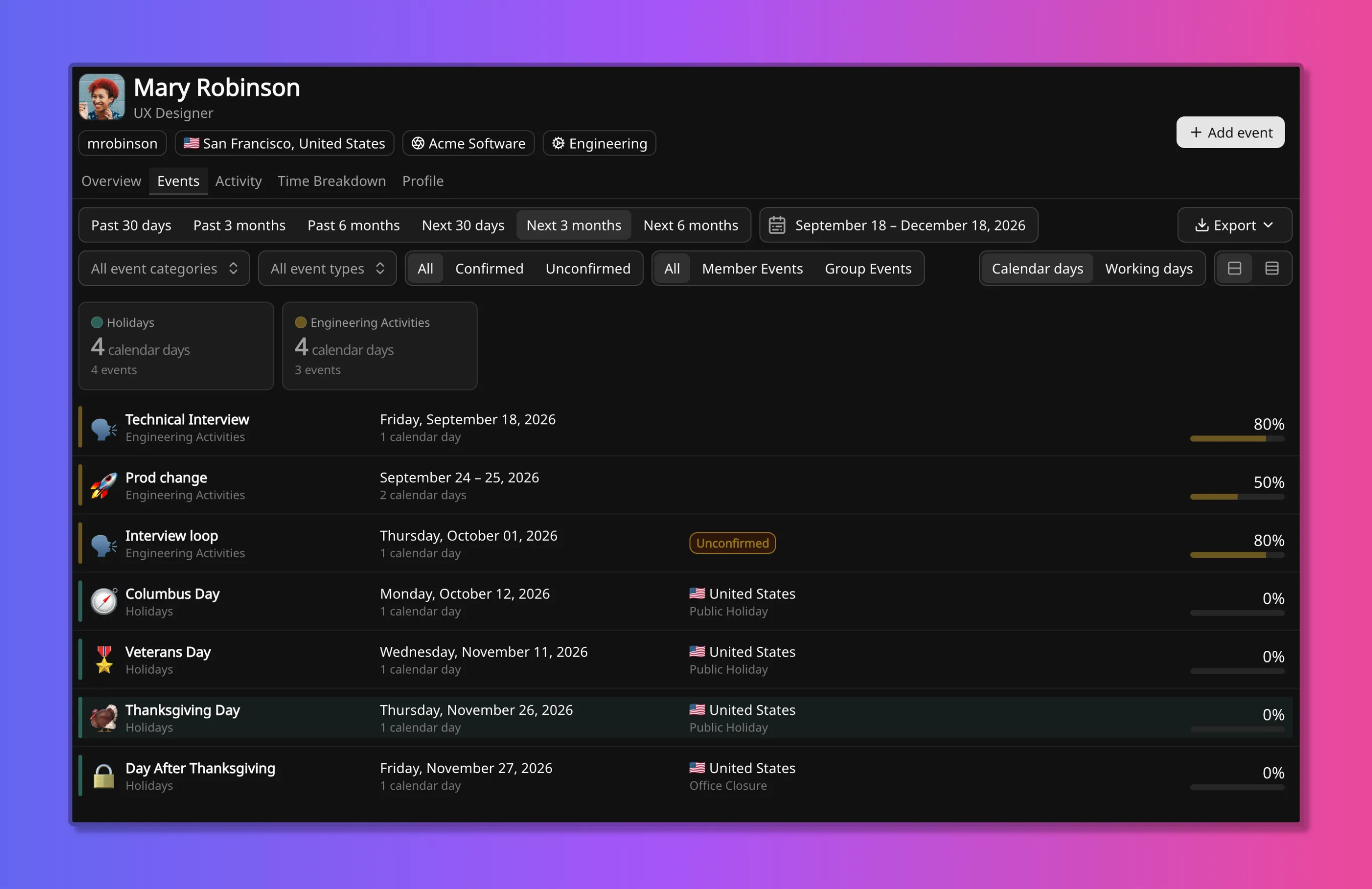
The Member Events report is a flat, chronological list of the events on one person. Every figure in every other report is an aggregate of records like these.
It is the Events tab on a member.
It lists events, not edits. What an event says now is here; who changed it and what it said before is on the Activity report, a separate tab on the same member.
Date range
Section titled “Date range”The range runs six months back and six months forward. Chips cover the past 30 days, three months, and six months, and the next 30 days, three months, and six months, with an explicit date range beside them.
The forward half is the point of the report. Backward, it is what a period was made of. Forward, it is what is already booked: approved leave, a training block, the holidays that will reach this person.
List rows
Section titled “List rows”Each row carries the event name and category, the dates and duration, and the availability in force while the event runs. Group event rows also carry a country and the group event type.
Availability is shown as a percentage with a proportional bar. The value is availability
remaining: 0% is fully away, 50% leaves half the person’s time. A 0% row draws an empty
bar.
Two rows can fall on the same day. A project day and a public holiday on the same date are two records, both listed. The list does not resolve them into one figure; the lowest-value rule does, on How coverage is calculated.
Category totals
Section titled “Category totals”A card per category sits above the list, totalling days and events for the range in view. The two numbers differ, and the difference reads: 21 days across 2 events is two long absences, 4 days across 4 events is four separate days.
Categories with no events in the range do not appear.
Group events
Section titled “Group events”Group events that reach this member appear in the same sequence as their own events, recognisable by the country on the row.
Membership is derived from location, not chosen per event, so holidays and closures land here without anyone adding the member to them.
The All / Member Events / Group Events control separates the two. Filtering to Group Events is the quickest check that somebody’s country code is set correctly.
Filters
Section titled “Filters”| Control | Effect |
|---|---|
| Category and type | Restrict to one category, or one type inside it |
| Member Events / Group Events | Restrict to one kind of event |
| All / Confirmed / Unconfirmed | Restrict by confirmation state |
| Calendar days / Working days | Change the unit durations and totals are counted in |
Confirmation
Section titled “Confirmation”Confirmation applies to member events only. An unconfirmed event is recorded but not yet agreed: a provisional training date, leave still being requested. Filtering to Unconfirmed finds what is still open.
Calendar days and working days
Section titled “Calendar days and working days”The same toggle as on Member Time Breakdown. Calendar days counts every day in a span. Working days follows the working week, so a two-week absence reads as ten days rather than fourteen.
Group events at 0% make the days they cover non-working for the people they match. A holiday
inside a longer absence therefore does not add to the working-day count twice.
Export
Section titled “Export”Export produces a CSV of the list as filtered, not the whole range. Filter first, then export. Available on every plan, with nothing to set up.
The same records are available programmatically through
memberEvents and
groupEvents. See the
schema reference.
Related
Section titled “Related”Three views describe the same person.
- Events, this report: the individual records, backward and forward.
- Member Time Breakdown: the same range aggregated into categories and types, with the primary, secondary, and non-working split.
- Activity: what changed, who changed it, and what it was before.
For a team rather than a person, the equivalents are Time Distribution and Coverage Outlook.
This is a description of planned time in whole days, not a timesheet. It does not track hours worked.