

Time Distribution
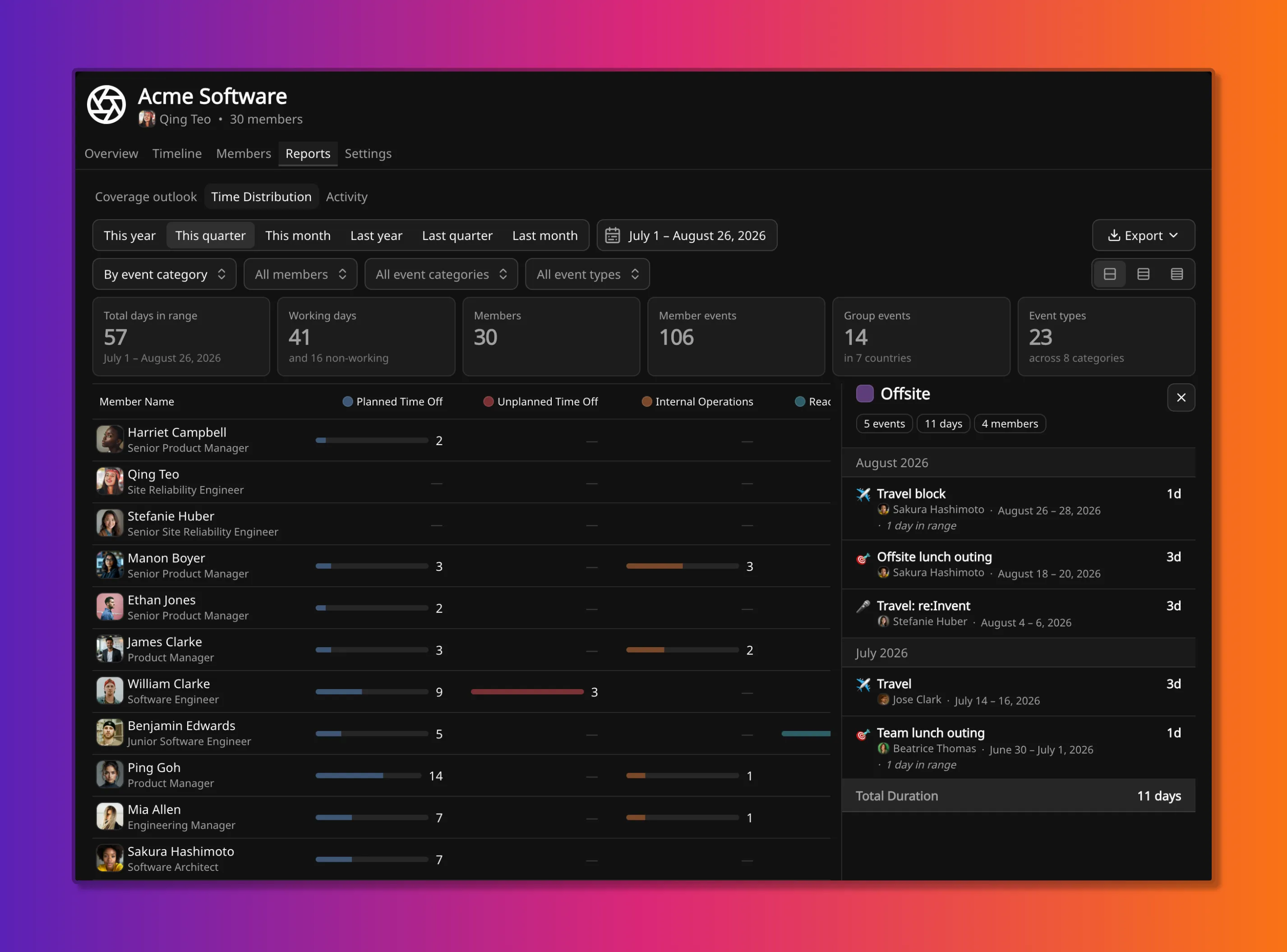
Time Distribution shows what a period was spent on, member by member, across one team.
It is the composition of a stretch of coverage: whose time went where. It does not give the size of a gap, and it does not plot the days ahead. Size and forward coverage are on Coverage Outlook.
This is a team report. The same attribution for one person is Member Time Breakdown.
Location
Section titled “Location”The report is on a team, under Reports → Time Distribution. The period, the members in view, and the event categories or types that count can be limited.
Grouping
Section titled “Grouping”The columns are one question about the same days. Changing grouping changes the question, not the people.
By event category (the default) is the usual first cut: how much of the period was leave, training, offsite, holidays, and so on.
By event type splits those categories. It is the next cut when Planned Time Off is not enough, and Annual Leave must be read against Parental Leave, or Training against Project.
By time type is a different question: how much of each person’s time was Primary, Secondary, Standby, or Non-working. Days with no event are included in these columns. They are not included in category or type columns.
Time type lives on the event category. Starting points, and the baseline time type used when nothing is scheduled, are on How availability works. Changing a category’s time type reclassifies this report and leaves every coverage figure untouched.
How a figure is counted
Section titled “How a figure is counted”Each row is one member. Each cell is days in the selected range for that member and column.
Category and type columns sum event duration. Each event contributes the
calendar days it occupies inside the range. Overlapping events in the same
column both count: a five-day project overlapping two days of training in
Internal Operations shows 7 in that column, not 5. Unscheduled days do not
appear.
Time-type columns classify each day once. A day with events takes one time type, not both if two overlap. A day with none takes the team’s baseline time type (usually Primary) on a working day, or Non-working on a non-working day.
A group event adds its in-range days once per matching member. A public holiday that matches five people contributes five times to the column total, once on each row.
Events that start or end outside the selected range are clipped, not excluded.
A trip dated 26 to 28 August contributes 1 if the range ends on 26 August.
A cell that has a bar opens a drill-down of the events behind that member and column. A team total in the footer opens a total drill-down for the same column across the team. Both lists use in-range days only.
Calendar days and working days
Section titled “Calendar days and working days”By event category and By event type always count calendar days of events. There is no working-days switch in those groupings.
By time type can count calendar days or working days. Working days omit each member’s non-working days. An event that sits only on those days, such as Saturday on-call, does not count in that mode.
Export
Section titled “Export”Export downloads the matrix, plus the member events and group events in the range, as a CSV.
CSV is the route for figures as this report presents them, with its filters applied. Forward
coverage is available through coverageOutlook; the
API does not return this report’s attribution matrix.
Related
Section titled “Related”- Member Time Breakdown is the same attribution for one person.
- Coverage Outlook is the size of the gap, forward against a target.
- How availability works is time type, baseline time type, and calendar days versus working days.
- How coverage is calculated is the coverage number these reports do not compute.