

Member Time Breakdown
Time Breakdown answers how one person spent a period, attributed by time type.
It lives on the member. The team view of the same question is Time Distribution. Typical uses are a one-to-one, or explaining an uneven split on the team report from that person’s events.
Time type is a reporting label. It does not change availability or coverage. Someone on standby can be fully available for coverage and still show as Standby here.
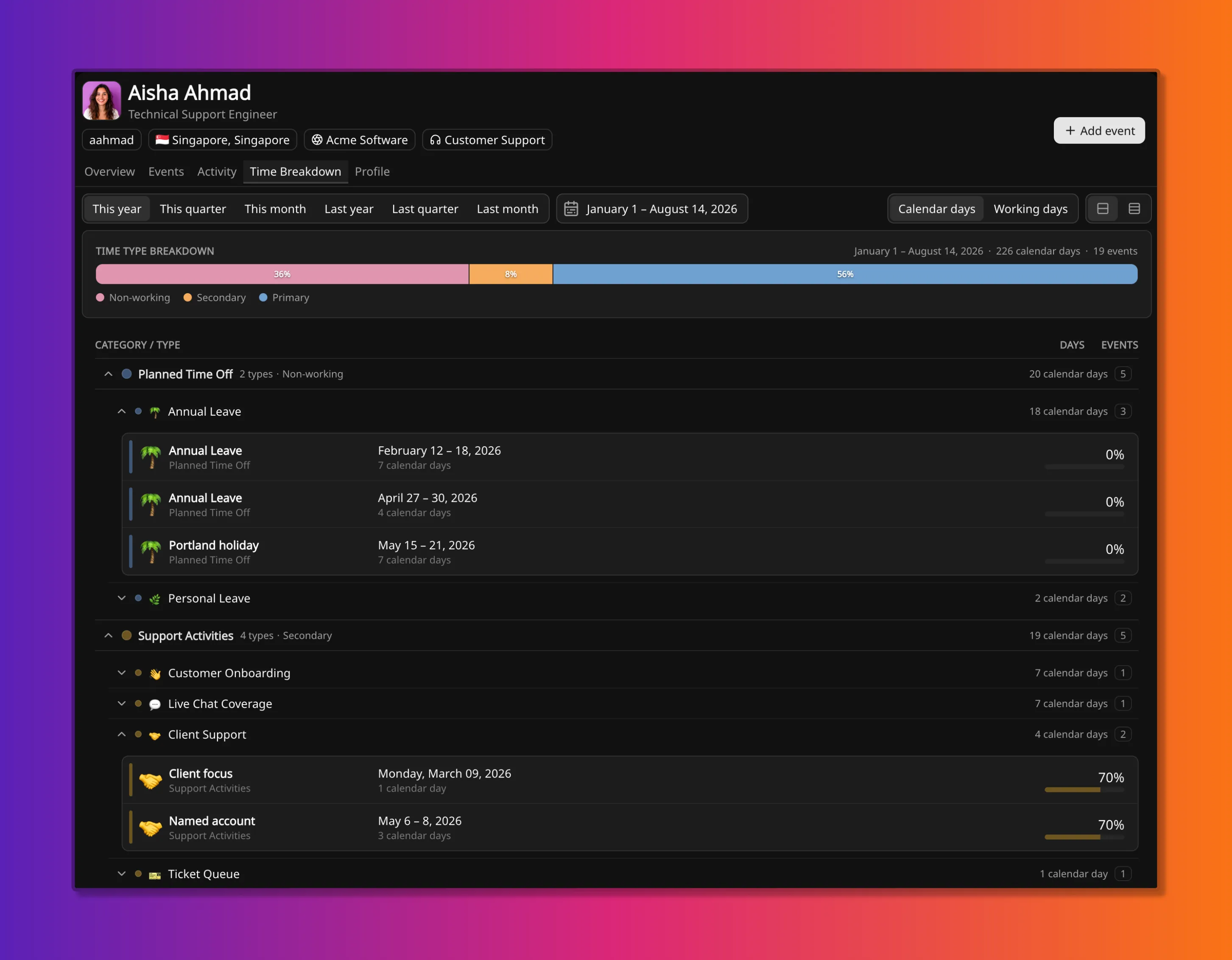
Where it lives
Section titled “Where it lives”The report is the Time Breakdown tab on a member. The default period is this year, from 1 January through today. The range can be a quarter, a month, or last year.
What the bar shows
Section titled “What the bar shows”The stacked bar is the share of included days in each time type. Time types are defined on event categories; that explanation lives on Event categories and types. Each segment has a tooltip with additional details for that time type.
Each included day is attributed once:
- If an event covers the day, the day takes that event’s category time type. When several events overlap, the event that stacks on top on the timeline wins.
- If no event covers a working day, the day takes the baseline time type: the team’s, when the member belongs to exactly one team, otherwise the workspace default.
- If no event covers a non-working day, Calendar days counts it as Non-working. Working days omits it.
Days with no events still classify. A quiet stretch of primary work is the baseline time type, not a hole in the bar.
Events under the bar
Section titled “Events under the bar”The list under the bar is the events that produced the split. A category expands to its types, then a type to its events. Depth can stop at “how much leave”, “which project”, or “which week”.
Group events that match this member appear in the same list, under their category and type.
Each event still shows availability remaining (0%, 70%,
100%). That is a different dimension from time type. A secondary project at 70% still
counts as a full day of Secondary. Availability does not shrink the day total.
The bar and the list can disagree on totals. The bar gives each day to one time type. The list sums event durations, so overlapping events both count.
Unconfirmed events are labelled as such and still count, as they do for availability.
Calendar days or working days
Section titled “Calendar days or working days”Calendar days (the default) counts every day in the range, including the member’s non-working days. Working days drops those days from the bar and from event durations.
The calendar versus working-day rule is the same as on How availability works.
Related
Section titled “Related”- Time Distribution is the team view: every member, by category or time type.
- Event categories and types is where time type is defined.
- How availability works is baseline, the working week, and time type.
- How coverage is calculated is the people total. Time type never enters that calculation.
- Member events is how events are created.