

Group events
A group event is a claim about a period that applies to everyone whose location matches, rather than to a named list of people. Public holidays, office closures, a shutdown week, reduced summer hours, a site-wide all-hands.
It is entered once. The people it reaches are worked out from location every time coverage is calculated, not stored as a list when the event is created. Someone who joins the Munich office in March picks up the German holidays already on the calendar, and nobody has to go back and add them.
Group events are whole calendar days, like member events. They carry an event type and an availability value: how much of a matching member’s time remains available while the event runs.
Targeting by location
Section titled “Targeting by location”Every member and every group event is located with up to three fields: a country, an optional subdivision (a state, region, province, or similar, depending on the country), and an optional locality such as a city.
In the app, country and subdivision are usually chosen from dropdowns. For many popular countries Temprix ships a fixed list of subdivisions, labelled for that country (State, Province, Land, and so on). A member or admin picks Bavaria or New South Wales, not an internal subdivision code. Locality is free text.
Matching uses the most specific level the event declares:
| The event declares | It matches |
|---|---|
| Country | Every member in that country |
| Country and subdivision | Members in that country whose subdivision also matches |
| Country, subdivision, locality | Members who additionally match on locality |
A country is required. The app does not allow a group event without one, so a country is the broadest target available. An organisation running in three countries keeps three rows for a holiday observed in all three, each with its own membership.
A member’s extra detail never narrows a broader event. Someone recorded as Germany, Bavaria, Munich is matched by a German national holiday, by a Bavarian one, and by a Munich office closure alike. The event decides how far down it reaches.
Where no subdivision list exists for a country, targeting stops at country level. Localities are
compared case-insensitively, so Munich and munich are the same place. Munich and
München are not.
How that match enters coverage is on How coverage is calculated. This page does not repeat that rule.
Creating a group event
Section titled “Creating a group event”Workspace admins create, edit, and delete group events in Workspaces, under Configuration → Group Events. That is separate from Group Events in the main app sidebar, which opens the browser below and does not add or change events.
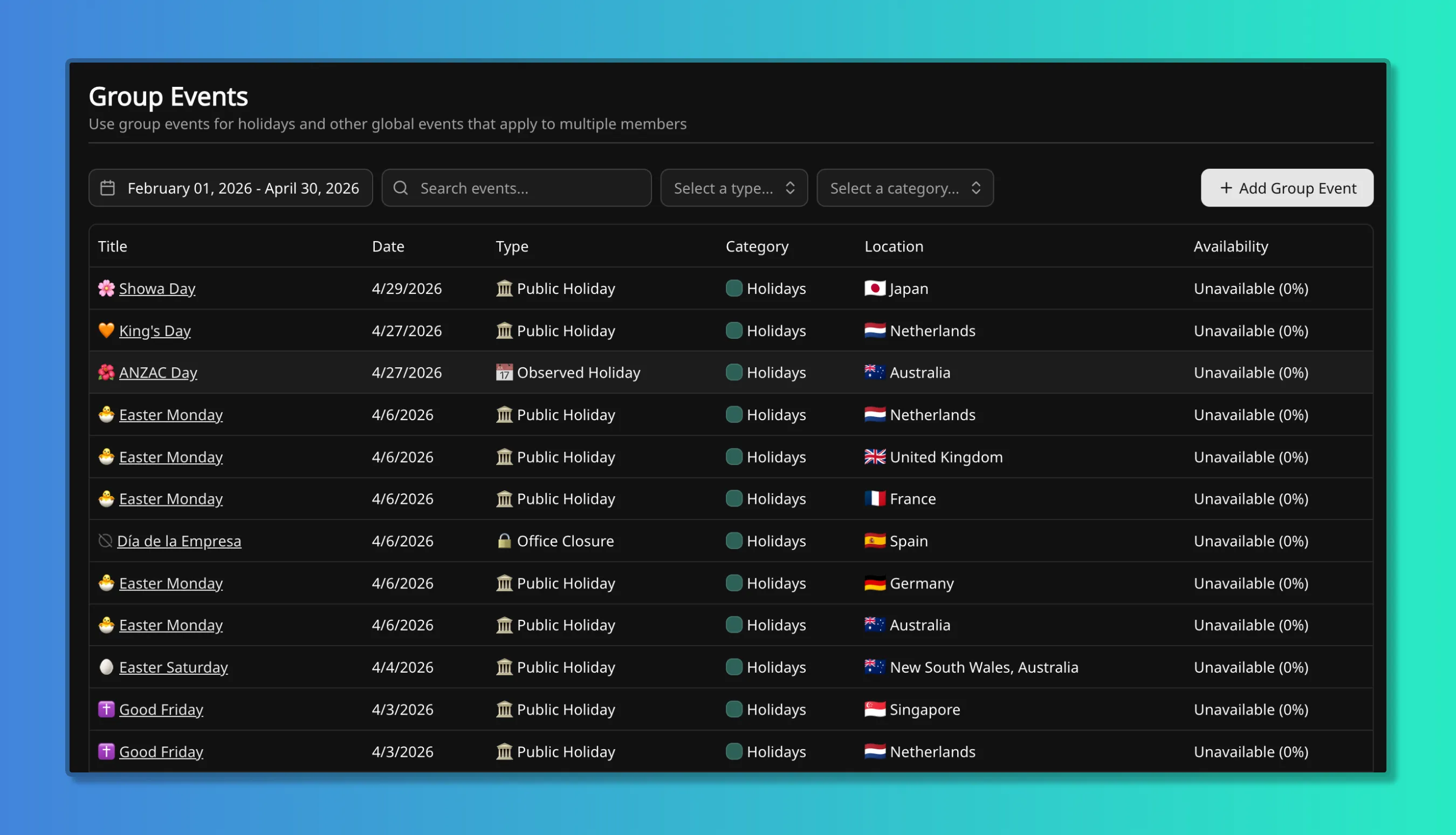
An event carries a title, an icon, a group-scoped event type, its location fields, a start and end date, an availability value, and optional notes.
The event type must be group-scoped. Group and member scope do not mix: a group-scoped category cannot be used for an individual’s event, and a member-scoped category cannot be used here. In the default dataset the only group category is Holidays, with three types: Public Holiday, Observed Holiday, and Office Closure. Scope is fixed when a category is created. See Event categories and types.
Availability pre-fills from the type, which inherits from its category. Holidays sits at 0%.
The value can be changed on the event. A group event is not required to be 0%: a shutdown week
at 50% or a summer-hours period at 80% is a legitimate group event.
Two group events cannot share the same country, subdivision, locality, and dates. If that conflict appears, the location or the dates must change.
Group events differ from member events in four ways:
- No recurrence. Each occurrence is its own event. Next year’s holidays are entered as next year’s events. Most public holidays move against the working week from year to year anyway, and observed dates shift when a statutory date falls on a weekend.
- No confirmation state. A group event is not tentative. It applies from the moment it is saved.
- No non-working-time setting. A group event cannot be set to count on weekends. A member event can still be flagged to count on a day a group event turned into non-working time, which is how a holiday volunteer shift gets a non-zero value. That setting is on How availability works.
- No time zone. Dates are whole calendar days. A one-day holiday is that day everywhere it matches.
Setting up public holidays
Section titled “Setting up public holidays”Temprix does not import a holiday calendar. Holidays are entered as group events, once per holiday per country. A first pass for a distributed workspace usually runs as follows.
- Give members a country. Nothing matches until they have one. Add a subdivision only for countries where regional holidays actually differ, for example Germany or Australia. A subdivision that is never targeted costs nothing and does no work either.
- Establish which countries are in the roster. That is the list of holiday calendars the workspace needs, and it is usually shorter than the list of countries people assume.
- Enter the national holidays for the next twelve months, one event per holiday per country, using the Public Holiday type. A country-only event is the right choice for a statutory national day.
- Add regional holidays with a subdivision. Mariä Himmelfahrt applies in Bavaria and not in Berlin, so it is entered as a German event with the Bavarian subdivision set, not as a German national one.
- Add company closures with the Office Closure type, and observed dates with Observed Holiday. The distinction is for reporting; both behave the same way in coverage.
- Check the result in the Group Events browser (main app sidebar). An event showing
0 membersreaches nobody. That is sometimes correct, for a country the organisation plans to hire in, and is otherwise a sign of a mismatched country or a subdivision set too narrowly.
The same six steps cover anything else that follows geography. Holidays are the common case, not a separate mechanism.
How a group event reaches coverage
Section titled “How a group event reaches coverage”A matching group event enters the same rule as everything else: on any given day, a member’s availability is the lowest value among the events that apply to them. Coverage is the sum of those values across the team, in people. The full rule, with worked examples, is on How coverage is calculated.
On a 0% group event the day becomes non-working time for matching members, the same as a
weekend. Member events that are not flagged to count on non-working time have no effect on it.
A public holiday falling inside someone’s annual leave counts once, not twice. Both are at 0%,
and the member contributes 0 either way. Nothing is subtracted, so nothing double-subtracts.
The same holds for a holiday inside a sick period or parental leave.
Deactivated members are outside coverage entirely, whether or not a group event matches them.
The Group Events browser
Section titled “The Group Events browser”Group events are browsed for the whole workspace, not per team. Group Events in the main app sidebar answers what is coming, for every location, in one place: the Rotterdam manager sees that Munich is out on the 15th before planning around it. Everyone with access can open this view; only workspace admins manage the events themselves.
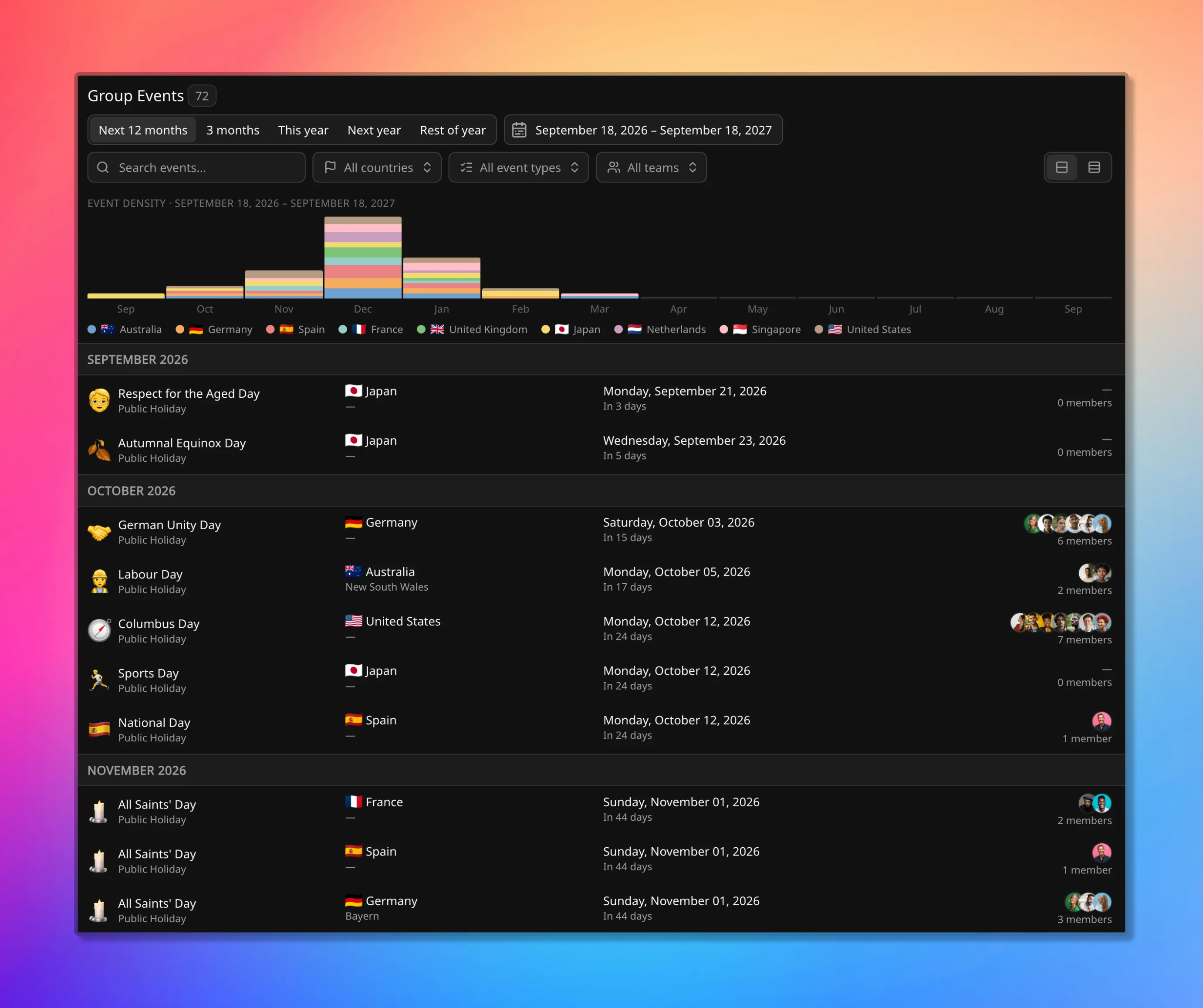
Each row shows how many members the event actually reaches. That count is derived from matching,
not from a stored list, so it is the quickest confirmation that an event is aimed correctly. The
same holiday appearing three times, once per country, each with its own count, is the expected
shape rather than duplication. An event showing 0 members reaches nobody.
Group events that reach a member also appear on that member’s own event list in the Member Events report, alongside their individual events.
Who can create them
Section titled “Who can create them”Creating, editing, and deleting group events is a workspace admin action. On Free, every member has admin access, so anyone can do it. Role enforcement begins on paid plans. See Members.
Team admin does not grant it. Group events are workspace-level by design: they follow geography, not team boundaries, and one event routinely reaches members of several teams at once. The group-scoped catalog they draw on is a workspace decision for the same reason, while teams extend the member-scoped catalog freely.
Everyone else consumes the result: the days on the Timeline, the figures in coverage, and the rows in reports.
Every create, update, and delete is recorded, with the actor and the time, in the Audit log.
Related pages
Section titled “Related pages”- How coverage is calculated: the lowest-value rule and non-working time
- How availability works: baselines, the working week, and time type
- Event categories and types: group scope, and what the default dataset seeds
- Member events: individual leave, training, on-call, and recurrence
- Members: location keys, statuses, and roles