

Workspaces
The first step to using Temprix is to create a workspace for the organisation.
A workspace is the home for all members, teams, events, and configuration in an organisation. Each workspace is a separate instance with its own roster, plan, and data region. Nothing is shared between workspaces: not members, not event configuration, not billing. Isolation is enforced at the API, not by filtering in the browser.
Workspace settings are an admin action. On Free, every member has admin access; role enforcement begins on paid plans. See Members.
An account can belong to at most 100 workspaces. Switching between them is on Your account. Separate workspaces suit genuinely separate organisations. For separate groups inside one organisation, use Teams, which share a member roster and can be reported on together.
Creating a workspace
Section titled “Creating a workspace”Creation requires a name, a dataset, and a data region. The name can change later. The dataset and the region cannot.
Dataset
Section titled “Dataset”Every workspace is seeded once, at creation, from one dataset. The choice is not stored as a setting and is not repeatable. Anything it seeds can be renamed, changed, or disabled afterwards.
| Dataset | Seeds |
|---|---|
| Default | Event categories and types, and nothing else |
| Demo | The default catalog plus a populated organisation: members, teams, and events |
Default is the normal starting point. The seeded catalog is on Event categories and types.
Default and Demo cannot be converted to each other after creation.
Data region
Section titled “Data region”Each workspace is created in one data region, either eu-central-1
(Frankfurt, short alias euc1) or us-east-1 (Virginia, short alias use1).
Workspace data is stored and processed there.
Two consequences in practice:
- Authentication runs in us-east-1 regardless of the region chosen. Sign-in credentials and account identity are handled there for every workspace.
- The region decides the API hostname. A workspace in eu-central-1 is
reached at the
euc1endpoint and one in us-east-1 at theuse1endpoint. An API key resolves to the region of the workspace it belongs to. See API overview — Endpoints.
What this means legally, including the roles under GDPR and the sub-processors involved, is on Security and in the Privacy Policy.
At creation, Temprix also assigns a namespace (the workspace URL segment). It is derived from the name plus an 8-character suffix and is not chosen during creation. See Namespace below.
Workspace settings
Section titled “Workspace settings”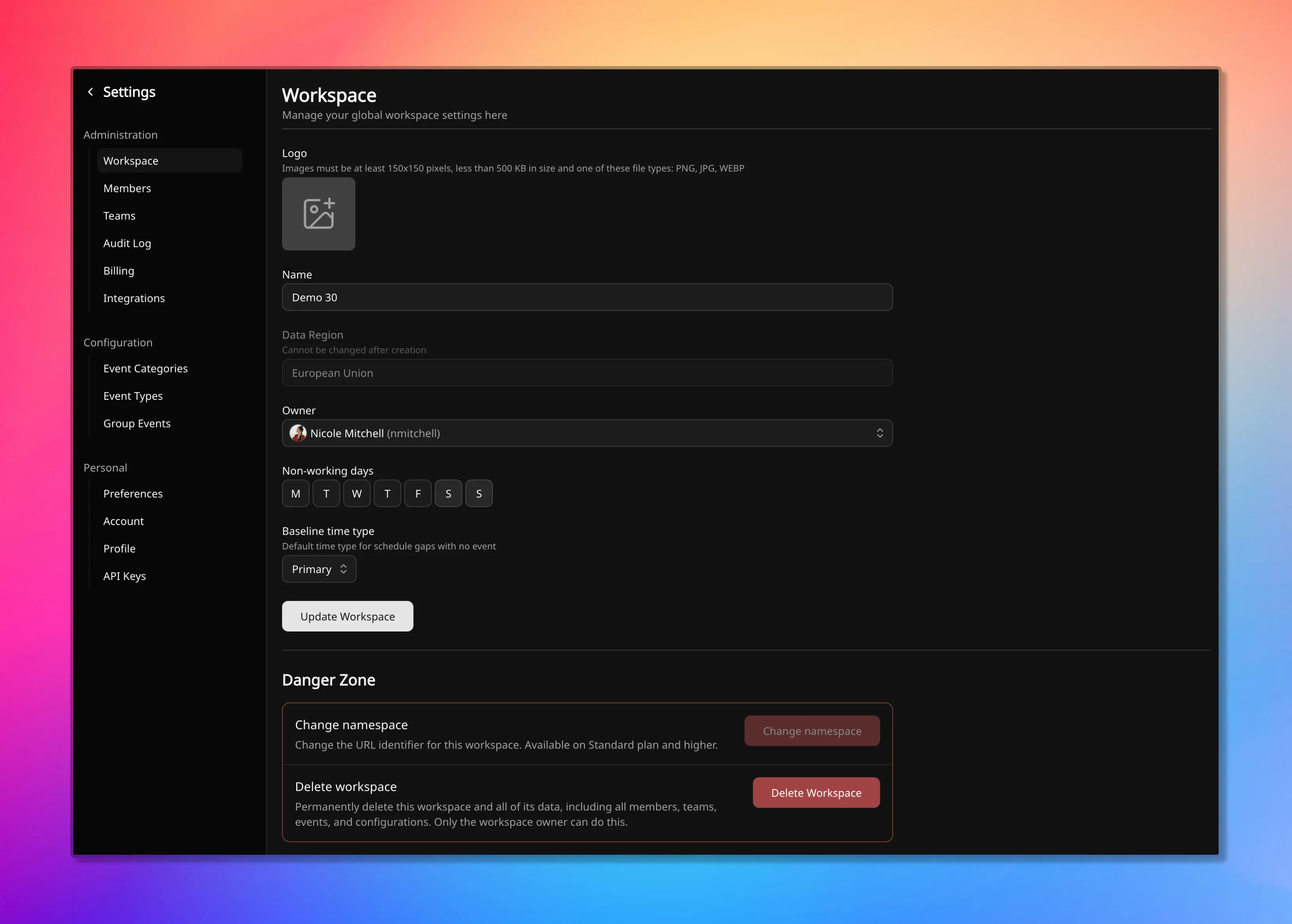
Workspace settings apply to everyone in the workspace. Admins can change most fields. Only the owner can transfer ownership, rename the namespace (on Standard or higher), or delete the workspace.
Name and logo
Section titled “Name and logo”The workspace name and logo are display only. They appear in the workspace switcher, in the sidebar, and on emails the workspace sends. Changing either takes effect immediately and affects nothing else. The name is not the namespace, and changing one does not change the other.
Working week and baseline time type
Section titled “Working week and baseline time type”Two workspace defaults change the numbers.
The working week sets which weekdays are non-working for everyone by default. A member can override it with their own pattern. Changing it recalculates coverage across the workspace, since non-working days carry zero availability unless an event is set to count on them. How those days enter availability is on How availability works.
The baseline time type is the classification reports attribute to a day with no event covering it. It affects Time Distribution and Member Time Breakdown only, never coverage. A team can override it for its own reports; multi-team views use the workspace value. See Event categories and types.
Ownership
Section titled “Ownership”Every workspace has one owner. The owner is the go-to person for account and billing matters and always holds admin access.
Only the current owner can transfer ownership, and only to an active member with an email address, meaning someone who can sign in. Workspace admins cannot transfer it. Ownership is separate from the admin role and from team ownership.
Namespace
Section titled “Namespace”The namespace is the workspace’s part of the URL:
https://temprix.app/<namespace>. It is unique across all of Temprix, so a
namespace is claimed rather than chosen.
Rules:
- 3 to 32 characters
- lowercase ASCII letters, digits, and hyphens
- no consecutive hyphens
- not a reserved word
Reserved words are names Temprix uses for its own routes and product surfaces
(such as docs, api, privacy, login, and temprix). They are rejected
on exact match.
A live availability check runs while the namespace field is edited. That check is advisory. It answers whether the name was free a moment ago, and it returns a plain no for malformed, reserved, and already taken alike, without saying which. The claim itself happens on submit, so a namespace can be taken between the check and the save. When that happens, the save fails and the name has to be changed.
Renaming the namespace
Section titled “Renaming the namespace”Renaming requires the Standard plan or above. On Free the namespace is assigned at creation and kept.
A rename can be made once every 24 hours. Inside that window the control is unavailable, and a submitted rename is rejected with the time it becomes available again.
Renaming to the current namespace does nothing and is not recorded.
What happens to existing links:
- The previous namespace is kept as a redirect, so links carrying it still resolve.
- Up to five previous namespaces are kept. The sixth rename drops the oldest.
- The previous namespace is released, not held. Another workspace can claim it, and the redirect stops working when they do.
Treat a rename as a change to a public address. In-app links between workspace members resolve either way, but links pasted into documents, tickets, and chat outlive the redirect if the old name is reclaimed.
Deleting a workspace
Section titled “Deleting a workspace”Only the owner can delete a workspace.
Two things happen immediately, before the window elapses:
- The workspace becomes inaccessible to its members.
- The namespace is released. It is free to claim from the moment of deletion, by anyone, including before the restore window has passed. A restored workspace does not get its namespace back if someone else has claimed it in the meantime.
Export anything worth keeping before deleting. CSV export is available from every report and tabular view, on every plan, and stops being available with the workspace.
Retention periods, and what happens to data after termination, are on Security and in the Terms of Service.
Related
Section titled “Related”- Members: roster, statuses, admin roles, and the owner
- Teams: the unit inside a workspace that coverage is planned for
- How availability works: the working week
- Your account: sign-in, profile, and switching workspaces
- Audit log: where workspace changes are recorded
- API overview — Endpoints: API hostnames